 Pagewood
A field journal of every study session
Each session is pressed into your journal as a numbered specimen: the tree, the date, how long, and the intention you wrote. Over weeks, the pages become an honest record of the work you've put in.
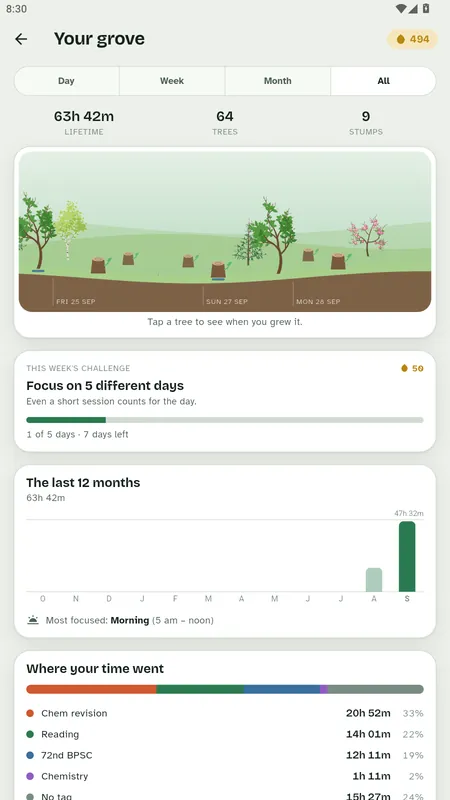
What the journal shows you
- Lifetime focus time, trees grown and stumps.
- Day, week, month and all-time views.
- A 12-month focus chart and your most focused time of day.
- "Where your time went": time and percentage per tag.
- A weekly challenge based only on time, like focusing on 5 different days.
Intentions turn time into progress
Before you plant, write what the session is for: "Chemistry, chapter 4 problems". It sits at the top of the page while you focus and stays in the journal afterwards, so you can see not just how long you studied but what you studied.
Your journal is yours
The journal lives on your phone and works offline. Back it up or export it as CSV whenever you like. If you sign in, it syncs to your other devices and is readable only by you. Delete the account and the synced copy is gone.
Questions people ask
Can I export my study log?
Yes. Export your sessions as CSV, or back up your whole journal, at any time from Settings.
Can I tag sessions by subject?
Yes. Create tags for subjects, projects or anything you like, and see your time per tag in the stats.
What happens to a session I stopped early?
It's kept as a stump in your woodland. The minutes you focused still count in your totals.
Keep reading
Focus & Study Timer: Pagewood · Android
Plant your next session.
Block distracting apps, grow a tree for every session and keep a field journal of your study. Works offline, no ads, no tracking.

