 Pagewood
Strict mode: the session you actually finish
Strict is Pagewood's default focus mode. With app blocking on, distracting apps rest until your tree has grown; without it, Pagewood forgives one slip and only counts the second.
| Strict (default) | Gentle | |
|---|---|---|
| Leave Pagewood during a session | Apps you haven't allowed show the resting page (with blocking on) | Your tree pauses |
| Without blocking permissions | First slip forgiven, second turns the tree into a stump | Your tree pauses |
| Count-up sessions | Also strict | Also gentle |
| Stopping early | Tree becomes a stump; minutes still count | Tree becomes a stump; minutes still count |
| Best for | Exam prep, deep work, phone-heavy days | Light days, reading, when you need flexibility |
Mercy is part of the design
Strict doesn't mean harsh. A stump is never shown as a failure: it stays in your woodland and the minutes you focused still count toward your totals. You can undo a start in the first 10 seconds. And if something urgent comes up, holding for 3 seconds opens any app.
Why Strict is the default
Most people who download a focus app want help with their phone. Making the helpful option the default means it works from the first session, while Gentle stays one tap away in Settings for the days you need it.
What a Strict session looks like
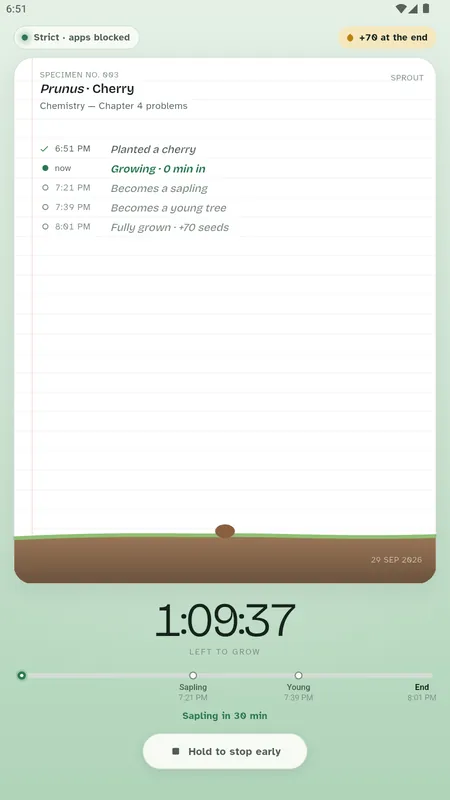
The top of the page says Strict · apps blocked, and your journal page lists exactly when your tree becomes a sapling, a young tree and fully grown. To stop early you hold the button, so a stray tap never ends a session.
Questions people ask
What is the difference between Strict and Gentle mode?
Strict mode (the default) blocks other apps during a session once you allow it, and a stopped session becomes a stump. Gentle mode never blocks: if you leave Pagewood, your tree simply pauses and continues when you come back.
How do I switch to Gentle mode?
Open the menu, then Settings, and choose Gentle under Focus mode. It applies to new sessions.
Can I undo a session I started by mistake?
Yes. In the first 10 seconds after you plant, undo the start and nothing is recorded.
Keep reading
Focus & Study Timer: Pagewood · Android
Plant your next session.
Block distracting apps, grow a tree for every session and keep a field journal of your study. Works offline, no ads, no tracking.

